How to Block an IP Address to Deny Access to Your Website

You can blacklist an IP Address to deny access to your website.


1. Log in to your cPanel account.


2. In the Security section, click on IP Blocker.


3. Under the Add an IP or Range, you should enter the IP Address you want to block.
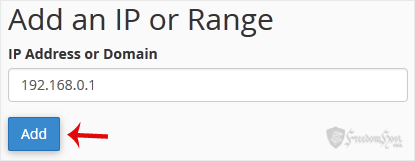

4. Click on Add.


Here is Example:
Single IP Address: 192.168.0.1
Range: 192.168.0.1-192.168.0.40
Implied Range: 192.168.0.1-40
CIDR Format: 192.168.0.1/32
Implies 10.*.*.* -- 192.

  • 0 Users Found This Useful
Was this answer helpful?

Related Articles

How to Block Any IP Address via an htaccess Rule

If you want to block an IP Address, you can add the below lines to your htaccess file. order...

How to Restrict Access to Directories by IP Address

To secure your admin area from hackers, you should only allow access to your admin directory from...

Powered by WHMCompleteSolution