How to Delete "User Level Email Filter" in cPanel

1. Log in to your cPanel account.


2. In the Email section, click on Email Filters.


3.
Under Filters by Users, you can see all your existing email accounts. Click on Manage Filters next to the appropriate one.


4. Under Current Filters, click on Delete next to the appropriate filter you want to remove.
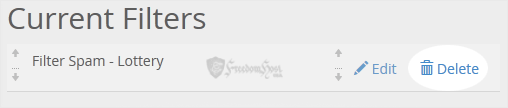

5. Now click on Delete Filter to remove your filter.

  • 0 Users Found This Useful
Was this answer helpful?

Related Articles

How Email Accounts Can Get Hacked and How to Prevent It

Email accounts are a common target for hackers due to the wealth of personal and professional...

How Email Accounts Can Get Hacked and How to Prevent It

Email accounts are a common target for hackers due to the wealth of personal and professional...

How to Enable BoxTrapper in cPanel

BoxTrapper requires all email senders not on your Whitelist to respond to verification emails. It...

How to Enable BoxTrapper in cPanel

BoxTrapper requires all email senders not on your Whitelist to respond to verification emails. It...

How to set up DMARC

DMARC (Domain-based Message Authentication, Reporting and Conformance) is an e-mail...

Powered by WHMCompleteSolution